




Skip to Content
Northwoods
Main Content

Hiker looking out over the mountains

4 Minute Read | March 16, 2026

When Convenience Meets Accessibility: The "Listen" Era

Imagine a feature that not only reads text to you but also, through artificial intelligence, transforms articles into podcast-style conversations between two AI voices.

Well, stop imagining. In late 2025, Google announced the AI Playback addition to the "Listen to this page" function in its Chrome browser.

AI Playback is no mere audio perk for commuters. It represents a significant milestone in normalizing web accessibility. This addition blurs the lines between features designed to meet specific needs and features that benefit everyone.

As our ways of consuming web content evolve, one thing is becoming clear: Accessibility best practice isn't just a nice-to-do. It’s the only way to stay relevant.

The Evolution of Reading and Listening

Reader modes didn’t start with Chrome – they began over a decade ago with tools like Safari’s Reader View that reimagined cluttered web pages for focused reading.

Users have long been able to personalize typefaces, font sizes, and color schemes to improve productivity and tailor their devices to work better for them. More sophisticated audio is another wave of user accessibility preference.

  • Reading Mode (2023): Focused on visual clarity and reducing cognitive load.
  • Listen to This Page (2024): Introduced a high-quality Read Aloud player for Android.
  • AI Podcast Mode (2025): Transformed static text into dynamic, narrated summaries.
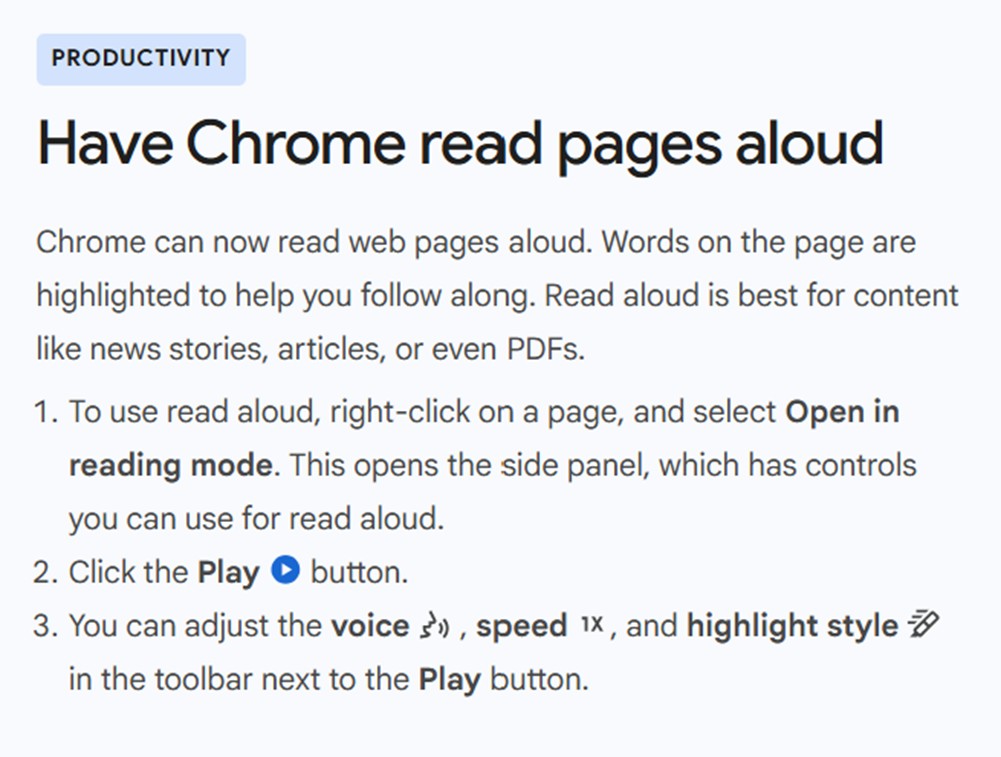
A description of how Chrome reads pages out loud

Why “Read Aloud" Is a Screen Reader in Disguise

When Chrome reads a page out loud for everyone, it does exactly what screen readers have done for decades for the visually impaired. The "podcast" upgrade relies on:

  1. Semantic Structure: Recognizing headings, lists, and paragraphs.
  2. Source Order: Following the logical flow of the code rather than just the visual layout.
  3. Alt Text: Incorporating image descriptions into the narrative flow.
  4. Accessible Labels: Understanding what buttons and form fields do.

In other words, the browser is reading what the page means, not just what it looks like.

Good Accessibility Is Good UX (and Good SEO)

We’ve demonstrated that strong accessibility is good SEO, and Listen Mode proves that accessibility best practices are simply best practices. When you structure a page correctly, you aren't just checking a compliance box. You’re making your content:

  • easier to skim for visual readers;
  • easier to follow for people with ADHD (they rely on structure);
  • easier to navigate for keyboard-only users; and
  • easier to digest for anyone who wants to listen while they cook, drive, or rest their eyes.

How to Prepare for the Audio Future

To ensure your users can interact with your content in the best way possible – no matter whether they see or hear that content - focus on these fundamentals:

  • Clear Headings. Headings define sections to help users scan, apply logical hierarchy to the content, and help AI tools summarize effectively. Watch this video to learn more.
  • Logical Reading Order. The code on the page must match the flow of your information to make sense in any context, even if visuals are stripped away. Imagine if the previous sentence came just after the article title on this page – anyone reading or listening would be confused.
  • Descriptive Link Text. Avoid such text as "click here." Instead, use link text that tells the user where the link will take them, like “view pricing plans,” that describe the destination. When images are linked, alt text should inform the user of the link destination, not the image characteristics.
  • Meaningful Image Descriptions. Write alternative text for images that explains what the image communicates, not just what it contains. Instead of “people in an office,” you might use something like “three architects collaborating around a set of blueprints.”

As technology continues to change the way we navigate the web, the foundation remains the same. A well-structured, accessible page is the most resilient content you can create.

No matter where you're at in your web accessibility journey, our accessibility experts are here to guide you. Reach out to learn more.


Authored By

Sydney Shimko

Sydney Shimko

Front End Development Practice Lead

Share on Social Media

hand-drawn owl

Get Expert Tips

446492/Blog/When-Convenience-Meets-Accessibility-The-Listen-Era4
<p style="margin-bottom:11px">Imagine a feature that not only reads text to you but also, through artificial intelligence, transforms articles into podcast-style conversations between two AI voices.</p> <p>Well, stop imagining. In late 2025, Google announced the AI Playback addition to the &quot;Listen to this page&quot; function in its Chrome browser.</p> <p>AI Playback is no mere audio perk for commuters. It represents a significant milestone in normalizing web accessibility. This addition blurs the lines between features designed to meet specific needs and features that benefit everyone.</p> <p>As our ways of consuming web content evolve, one thing is becoming clear: <a href="https://www.nwsdigital.com/Services/Websites/Web-Accessibility" linktype="3" target="_self">Accessibility</a> best practice isn&#39;t just a nice-to-do. It&rsquo;s the only way to stay relevant.</p> <h2>The Evolution of Reading and Listening</h2> <p>Reader modes didn&rsquo;t start with Chrome &ndash; they began over a decade ago with tools like Safari&rsquo;s Reader View that reimagined cluttered web pages for focused reading.</p> <p>Users have long been able to personalize typefaces, font sizes, and color schemes to improve productivity and tailor their devices to work better for them. More sophisticated audio is another wave of user accessibility preference.</p> <ul> <li><strong>Reading Mode (2023): </strong>Focused on visual clarity and reducing cognitive load.</li> <li><strong>Listen to This Page (2024): </strong>Introduced a high-quality Read Aloud player for Android.</li> <li><strong>AI Podcast Mode (2025):</strong> Transformed static text into dynamic, narrated summaries.</li> </ul> <p><img alt="A description of how Chrome reads pages out loud" height="264" loading="lazy" src="/Northwoods-2023/Blog/Article-Images/Listen-Era-1.jpg?PortfolioTeaser" width="350" /></p> <h2 style="margin-bottom:5px; margin-top:11px">Why &ldquo;Read Aloud&quot; Is a Screen Reader in Disguise</h2> <p>When Chrome reads a page out loud for everyone, it does exactly what screen readers have done for decades for the visually impaired. The &quot;podcast&quot; upgrade relies on:</p> <ol> <li><strong>Semantic Structure:</strong> Recognizing headings, lists, and paragraphs.</li> <li><strong>Source Order:</strong> Following the logical flow of the code rather than just the visual layout.</li> <li><strong>Alt Text:</strong> Incorporating image descriptions into the narrative flow.</li> <li><strong>Accessible Labels:</strong> Understanding what buttons and form fields do.</li> </ol> <p>In other words, the browser is reading what the page means, not just what it looks like.</p> <h2>Good Accessibility Is Good UX (and Good SEO)</h2> <p>We&rsquo;ve demonstrated that strong <a href="https://www.nwsdigital.com/Blog/Good-Web-Accessibility-Is-Good-SEO-Heres-Why-that-Matters" linktype="3" target="_self">accessibility is good SEO</a>, and Listen Mode proves that accessibility best practices are simply best practices. When you structure a page correctly, you aren&#39;t just checking a compliance box. You&rsquo;re making your content:</p> <ul> <li>easier to skim for visual readers;</li> <li>easier to follow for people with <a href="https://www.nwsdigital.com/Blog/Why-ADHD-Accessibility-Matters-in-Website-Development" linktype="3" target="_self">ADHD</a> (they rely on structure);</li> <li>easier to navigate for keyboard-only users; and</li> <li>easier to digest for anyone who wants to listen while they cook, drive, or rest their eyes.</li> </ul> <h2>How to Prepare for the Audio Future</h2> <p>To ensure your users can interact with your content in the best way possible &ndash; no matter whether they see or hear that content - focus on these fundamentals:</p> <ul> <li><strong>Clear Headings</strong>. Headings define sections to help users&nbsp;scan, apply logical hierarchy to the content, and help AI tools summarize effectively. <a href="https://youtu.be/BGJD-RumXKs" linktype="3" rel="noopener noreferrer" target="_blank">Watch this video to learn more</a>.</li> <li><strong>Logical Reading Order</strong>. The code on the page must match the flow of your information to make sense in any context, even if visuals are stripped away. Imagine if the previous sentence came just after the article title on this page &ndash; anyone reading or listening would be confused.</li> <li><strong>Descriptive Link Text</strong>. Avoid such text as &quot;click here.&quot; Instead, use link text that tells&nbsp;the user where the link will take them, like &ldquo;view pricing plans,&rdquo; that describe the destination. When images are linked, alt text should inform the user of the link destination, not the image characteristics.</li> <li><strong>Meaningful Image Descriptions</strong>.&nbsp;Write alternative text for images that explains what the image communicates, not just what it contains. Instead of &ldquo;people in an office,&rdquo; you might use something like&nbsp;&ldquo;three architects collaborating around a set of blueprints.&rdquo;</li> </ul> <p>As technology continues to change the way we navigate the web, the foundation remains the same. A well-structured, accessible page is the most resilient content you can create.</p> <p><em>No matter where you&#39;re at in your web <a href="https://www.nwsdigital.com/Services/Websites/Web-Accessibility" linktype="3" target="_self">accessibility</a> journey, our accessibility experts are here to guide you. <a href="https://www.nwsdigital.com/Contact-Us" linktype="3" target="_self">Reach out</a> to learn more.</em></p>
/Northwoods-2020/Hero-Images/Hiker-Looking-Out-Over-Mountains.pngHiker looking out over the mountainsSydney Shimko/Northwoods-2020/People/Sydney-Shimko.jpgSydney Shimko standing in front of a log cabin with soft, warm lighting<script charset="utf-8" type="text/javascript" src="//js.hsforms.net/forms/embed/v2.js"></script><script>hbspt.forms.create({ region: "na1", portalId: "23630176", formId: "40c5bbae-05a2-42ea-94dd-1662181fd56e" });</script>/Northwoods-2023/Blog/Social-Cards/When-Convenience-Meets-Accessibility-The-Listen-Era---Social-Card.jpg?LargeWhen Convenience Meets Accessibility: The "Listen" Era2026-03-16T00:00:00/Northwoods-2023/Blog/Social-Cards/When-Convenience-Meets-Accessibility-The-Listen-Era---Social-Card.jpgAI Playback represents a significant milestone in normalizing web accessibility – blurring the lines between features designed to meet specific needs and features that benefit everyone.3622111/People/Sydney-ShimkoSydneyShimkoFront End Development Practice Lead<p>Sydney is a skilled UX developer who seamlessly blends the aesthetics of thoughtful design with responsive, semantic code. With a passion for delivering top-notch solutions, she negotiates constant change in the field of front end development and ensures functionality across an ever-growing variety of devices and screen sizes. Sydney is also Northwoods&rsquo; go-to web accessibility expert, and she strives to deliver creative, efficient solutions that improve usability for everyone. When not crafting exceptional websites, Sydney is an avid mountain biker, road cyclist, and coffee enthusiast and serves on the board of the WI Interscholastic Cycling League.</p>Sydney ShimkoSydney is a skilled UX developer who seamlessly blends the aesthetics of thoughtful design with responsive, semantic code./Northwoods-2020/People/Sydney-Shimko.jpgSydney ShimkoAdd-In Type - NWS Data ModulesAudience - NWS Data ModulesCategory - NWS Data ModulesCommittee - NWS Data ModulesDivision - NWS Data ModulesEvent Audience - NWS Data ModulesEvent Service - NWS Data ModulesEvent Type - NWS Data ModulesFile Type - NWS Data ModulesLocality - NWS Data ModulesModule - NWS Data ModulesPackage Type - NWS Data ModulesPerson - NWS Data ModulesPersonID - NWS Data ModulesSydney ShimkoPractice Area - NWS Data ModulesProduct Version - NWS Data ModulesProductVersion - NWS Data ModulesRecord Maturity - NWS Data ModulesRecorded Webinar TopicsRegion - NWS Data ModulesResource Type - NWS Data ModulesSite Display - NWS Data ModulesSkillLevel - NWS Data ModulesTopic - NWS Data ModulesVideo Status - NWS Data ModulesVideoAudience - NWS Data ModulesVideoClassification - NWS Data ModulesVideoStatus - NWS Data ModulesTeamAll StaffDesignersDevelopersAdd-In Type - NWS Data ModulesAudience - NWS Data ModulesCategory - NWS Data ModulesCommittee - NWS Data ModulesDivision - NWS Data ModulesEvent Audience - NWS Data ModulesEvent Service - NWS Data ModulesEvent Type - NWS Data ModulesFile Type - NWS Data ModulesLocality - NWS Data ModulesModule - NWS Data ModulesPackage Type - NWS Data ModulesPerson - NWS Data ModulesPersonID - NWS Data ModulesSydney ShimkoPractice Area - NWS Data ModulesProduct Version - NWS Data ModulesProductVersion - NWS Data ModulesRecord Maturity - NWS Data ModulesRecorded Webinar TopicsRegion - NWS Data ModulesResource Type - NWS Data ModulesSite Display - NWS Data ModulesNWS DigitalSkillLevel - NWS Data ModulesTopic - NWS Data ModulesAccessibilityUX & Website StrategyWebsite DevelopmentVideo Status - NWS Data ModulesVideoAudience - NWS Data ModulesVideoClassification - NWS Data ModulesVideoStatus - NWS Data Modules02026-03-16T00:15:05.23700