




Skip to Content
Northwoods
Main Content

Hiker Looking Out Over Mountains

6 Minute Read | September 14, 2026

Google Ads Conversion Tracking: Are You Tracking the Right Conversions?

If you’re in marketing, you’ve likely heard the saying “what gets measured gets managed”. But knowing what to measure is half the battle. Track the wrong conversions in Google Ads, and you’ll miss key insights into what drives your business.

Many companies struggle to connect their ad spend back to real business goals, but closing that gap can really pay off. That’s because tracking doesn’t just mean cleaner data; it can also lead to increased sales, an improved understanding of your audience, and a stronger case for the marketing budget you need. 

Defining the right conversions in Google Ads is an essential step in building your marketing narrative and understanding  the customer journey. Here’s how to identify your conversions and avoid costly tracking mistakes.

What Is a Conversion in Google Ads?

Before you can optimize your Google Ads campaign, it helps to understand what a conversion is. In Google Ads, a conversion is defined as a specific action a user takes after interacting with your ad. You choose the conversions that matter most to your business, but they usually fall into one of these standard categories set by Google:

  • Lead Form Submissions
  • Contact Requests
  • Page Views on your website
  • Phone Calls
  • Purchases for e-commerce stores

Why Conversion Tracking Matters

Conversions are the backbone of your Google Ads campaigns, and they help tell Google where to focus your budget. Tracking them reveals which keywords and content drive the most valuable interactions, so you can optimize your campaigns and build around what’s actually working. 

This becomes especially important when using automated bidding strategies like Maximize Conversions. Google’s algorithm learns from your conversion actions, and it uses that data to determine where and how to allocate spend. If you track too many conversions or optimize toward actions that don’t reflect meaningful results, you’ll teach Google to prioritize the wrong behaviors and waste your budget on volume rather than value.

That’s why accurate conversion tracking is so important. The better data you give Google Ads, the better equipped it is to optimize toward the conversion actions that matter most to your business.

Types of Conversions: Primary vs. Secondary

Not every conversion should be treated equally. A page view and a completed lead form both show up in your Google Ads reporting, but they represent very different levels of intent from a user. That difference is exactly why Google Ads lets you distinguish between Primary and Secondary conversions. 
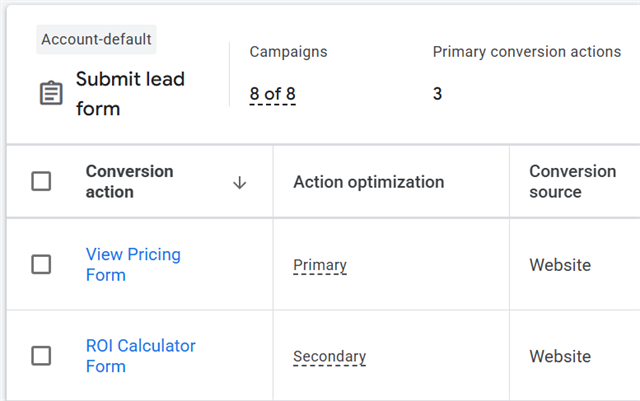
Primary and Secondary Conversions in Google Ads

Primary Conversions

Primary conversions are the actions Google Ads measures and optimizes for. Google’s algorithm identifies the users who are most likely to complete these specific conversion actions, then adjusts bidding and targeting to maximize them.  

Secondary Conversions

Secondary conversions function more as a tracking tool for actions that don’t carry as much weight, or don’t align directly with your business goals. Mark conversions as secondary when you still want visibility into them without influencing Google’s optimizations. Google will track these actions, but it won’t actively optimize your ads to drive more of them, unlike primary conversions. 

How Tracking the Wrong Conversions Can Hurt Performance

We’ve seen it before: a client celebrates getting hundreds of conversions while their lead form volume stays flat. The numbers look impressive at first glance, but they don’t translate to meaningful results. 

When we look under the hood of their Google Ads, we see that they’re tracking everything as a primary conversion – not out of neglect, but because it’s easy to assume that any data point is useful. This may be true in GA4, but in Google Ads, this approach backfires. Tracking the wrong conversions means Google will continue optimizing for whatever conversions are easiest to get. This often leads to lower quality actions that don’t move the needle for your business.

Example: 

Let’s say you have both a lead form and a page view set up as conversions. The page view tracking is going to account for far more conversions, simply because it requires less effort from the user. While a page view still counts as a conversion, it can be far less qualified than a completed lead form. 

If both lead form and page view are set up as primary conversions, Google Ads will notice the volume coming from the page views and optimize the campaign for more of those easy wins, often at the expense of the lead form conversion that better aligns with your business goals. 

Conversion Accuracy Matters, Too

Choosing the right conversions is important, but you also need to make sure that they are being measured correctly. Inaccurate tracking can give Google Ads the wrong signals about your campaign performance. 

Example:

Let’s say 10 people submit a contact form on your website, but a tracking issue causes each submission to fire twice. Google Ads would report 20 conversions, even though your business only received 10 leads. Your reporting now shows double the actual results.

This becomes an even bigger issue when using automated bidding. Google does not know that those 20 conversions are a mistake, so it uses inaccurate data to make optimization decisions. The result is budget wasted on the wrong campaigns, keywords, or ad placements.

Regularly review and test your conversion tracking to help ensure that both your reporting and Google’s optimization decisions are based on accurate data and real results.

Which Google Ads Conversions Should You Optimize For?

We get this question a lot, and it’s tough to answer without knowing the goal of your Google Ad campaigns. 

If lead generation is the priority, your campaigns might want to revolve around contact requests, lead forms, and phone calls. If you’re tracking ROAS or ecommerce sales, purchases is likely a better conversion to measure. And if you just want to build awareness of a product or service, page view conversions could be the right fit. 
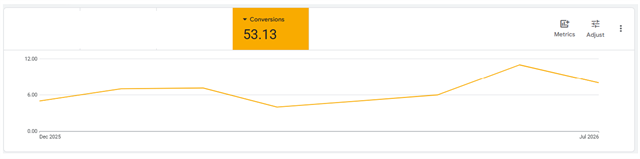
Google Ads conversion chart

Ultimately, there is no one-size-fits-all answer. The right approach starts with taking a step back and clearly defining what your business is trying to achieve, then building a conversion tracking plan around those specific goals. 

Audit Your Google Ads Conversion Tracking

If you aren’t sure whether you’re tracking the right conversions in Google Ads, I suggest starting with an audit to understand what is currently being tracked and which conversions align with your business goals. Look at all of your primary conversions, and if needed, either remove or reclassify them as secondary conversions. 

If you are unsure of the proper classification, ask yourself a simple question: is this something worth measuring (secondary conversion), or something worth optimizing our campaigns toward (primary conversion)?

Not sure where to start? Reach out! Our team can help you audit your current tracking, identify gaps, and implement a conversion strategy that connects your ad spend to measurable results.  

Authored By

Lucas Collum

Lucas Collom

Digital Marketing Strategist

Share on Social Media

hand-drawn owl

Get Expert Tips

448885/Blog/Google-Ads-Conversion-Tracking-Are-You-Tracking-the-Right-Conversions6
<p>If you&rsquo;re in marketing, you&rsquo;ve likely heard the saying &ldquo;what gets measured gets managed&rdquo;. But knowing <em>what </em>to measure is half the battle. Track the wrong conversions in Google Ads, and you&rsquo;ll miss key insights into what drives your business.</p> <p>Many companies struggle to connect their ad spend back to real business goals, but closing that gap can really pay off. That&rsquo;s because tracking doesn&rsquo;t just mean cleaner data; it can also lead to increased sales, an improved understanding of your audience, and a stronger case for the marketing budget you need.&nbsp;</p> <p>Defining the right conversions in Google Ads is an essential step in building your marketing narrative and understanding &nbsp;the customer journey. Here&rsquo;s how to identify your conversions and avoid costly tracking mistakes.</p> <h2>What Is a Conversion in Google Ads?</h2> <p>Before you can optimize your Google Ads campaign, it helps to understand what a conversion is. In Google Ads, a conversion is defined as a specific action a user takes after interacting with your ad. You choose the conversions that matter most to your business, but they usually fall into one of these standard categories set by Google:</p> <ul> <li>Lead Form Submissions</li> <li>Contact Requests</li> <li>Page Views on your website</li> <li>Phone Calls</li> <li>Purchases for e-commerce stores</li> </ul> <h2>Why Conversion Tracking Matters</h2> <p>Conversions are the backbone of your Google Ads campaigns, and they help tell Google where to focus your budget. Tracking them reveals which keywords and content drive the most valuable interactions, so you can optimize your campaigns and build around what&rsquo;s actually working.&nbsp;</p> <p>This becomes especially important when using automated bidding strategies like Maximize Conversions. Google&rsquo;s algorithm learns from your conversion actions, and it uses that data to determine where and how to allocate spend. If you track too many conversions or optimize toward actions that don&rsquo;t reflect meaningful results, you&rsquo;ll teach Google to prioritize the wrong behaviors and waste your budget on volume rather than value.</p> <p>That&rsquo;s why accurate conversion tracking is so important. The better data you give Google Ads, the better equipped it is to optimize toward the conversion actions that matter most to your business.</p> <h2>Types of Conversions: Primary vs. Secondary</h2> <p>Not every conversion should be treated equally. A page view and a completed lead form both show up in your Google Ads reporting, but they represent very different levels of intent from a user. That difference is exactly why Google Ads lets you distinguish between Primary and Secondary conversions.&nbsp;</p> <p><img alt="Primary and Secondary Conversions in Google Ads" height="401" loading="lazy" src="/Northwoods-2023/Blog/Article-Images/Google-Ads-Primary-vs-Secondary-Conversions.png?Large" width="640" /></p> <h3>Primary Conversions</h3> <p>Primary conversions are the actions Google Ads measures and <em>optimizes </em>for. Google&rsquo;s algorithm identifies the users who are most likely to complete these specific conversion actions, then adjusts bidding and targeting to maximize them. &nbsp;</p> <h3>Secondary Conversions</h3> <p>Secondary conversions function more as a tracking tool for actions that don&rsquo;t carry as much weight, or don&rsquo;t align directly with your business goals. Mark conversions as secondary when you still want visibility into them without influencing Google&rsquo;s optimizations. Google will track these actions, but it won&rsquo;t actively optimize your ads to drive more of them, unlike primary conversions.&nbsp;</p> <h2>How Tracking the Wrong Conversions Can Hurt Performance</h2> <p>We&rsquo;ve seen it before: a client celebrates getting hundreds of conversions while their lead form volume stays flat. The numbers look impressive at first glance, but they don&rsquo;t translate to meaningful results.&nbsp;</p> <p>When we look under the hood of their Google Ads, we see that they&rsquo;re tracking everything as a primary conversion &ndash; not out of neglect, but because it&rsquo;s easy to assume that any data point is useful. This may be true in GA4, but in Google Ads, this approach backfires. Tracking the wrong conversions means Google will continue optimizing for whatever conversions are easiest to get. This often leads to lower quality actions that don&rsquo;t move the needle for your business.</p> <p><em><strong>Example:&nbsp;</strong></em></p> <p>Let&rsquo;s say you have both a lead form and a page view set up as conversions. The page view tracking is going to account for far more conversions, simply because it requires less effort from the user. While a page view still counts as a conversion, it can be far less qualified than a completed lead form.&nbsp;</p> <p>If both lead form and page view are set up as primary conversions, Google Ads will notice the volume coming from the page views and optimize the campaign for more of those easy wins, often at the expense of the lead form conversion that better aligns with your business goals.&nbsp;</p> <h2>Conversion Accuracy Matters, Too</h2> <p>Choosing the right conversions is important, but you also need to make sure that they are being measured correctly. Inaccurate tracking can give Google Ads the wrong signals about your campaign performance.&nbsp;</p> <p><strong><em>Example:</em></strong></p> <p>Let&rsquo;s say 10 people submit a contact form on your website, but a tracking issue causes each submission to fire twice. Google Ads would report 20 conversions, even though your business only received 10 leads. Your reporting now shows double the actual results.</p> <p>This becomes an even bigger issue when using automated bidding. Google does not know that those 20 conversions are a mistake, so it uses inaccurate data to make optimization decisions. The result is budget wasted on the wrong campaigns, keywords, or ad placements.</p> <p>Regularly review and test your conversion tracking to help ensure that both your reporting and Google&rsquo;s optimization decisions are based on accurate data and real results.</p> <h2>Which Google Ads Conversions Should You Optimize For?</h2> <p>We get this question a lot, and it&rsquo;s tough to answer without knowing the goal of your Google Ad campaigns.&nbsp;</p> <p>If lead generation is the priority, your campaigns might want to revolve around contact requests, lead forms, and phone calls. If you&rsquo;re tracking ROAS or ecommerce sales, purchases is likely a better conversion to measure. And if you just want to build awareness of a product or service, page view conversions could be the right fit.&nbsp;</p> <p><img alt="Google Ads conversion chart" height="159" loading="lazy" src="/Northwoods-2023/Blog/Article-Images/Google-Ads-Conversion-Chart.png?Large" width="640" /></p> <p>Ultimately, there is no one-size-fits-all answer. The right approach starts with taking a step back and clearly defining what your business is trying to achieve, then building a conversion tracking plan around those specific goals.&nbsp;</p> <h2>Audit Your Google Ads Conversion Tracking</h2> <p>If you aren&rsquo;t sure whether you&rsquo;re tracking the right conversions in Google Ads, I suggest starting with an audit to understand what is currently being tracked and which conversions align with your business goals. Look at all of your primary conversions, and if needed, either remove or reclassify them as secondary conversions.&nbsp;</p> <p>If you are unsure of the proper classification, ask yourself a simple question: is this something worth measuring (secondary conversion), or something worth optimizing our campaigns toward (primary conversion)?</p> <p><em>Not sure where to start? <a href="/Contact-Us" linktype="2" target="_self">Reach out!</a> Our team can help you audit your current tracking, identify gaps, and implement a conversion strategy that connects your ad spend to measurable results. &nbsp;</em></p>

/Northwoods-2020/Hero-Images/Hiker-Looking-Out-Over-Mountains.pngHiker Looking Out Over MountainsLucas Collom/Northwoods-2020/People/Lucas-Collom.jpgLucas Collom in front of a log cabin wall with soft, warm lighting<script charset="utf-8" type="text/javascript" src="//js.hsforms.net/forms/embed/v2.js"></script><script>hbspt.forms.create({ region: "na1", portalId: "23630176", formId: "40c5bbae-05a2-42ea-94dd-1662181fd56e" });</script>/Northwoods-2023/Blog/Social-Cards/Google-Ads-Conversion-Tracking-Are-You-Tracking-the-Right-Conversions---Blog-Social-Card.jpgGoogle Ads Conversion Tracking: Are You Tracking the Right Conversions?2026-09-14T00:00:00/Northwoods-2023/Blog/Social-Cards/Google-Ads-Conversion-Tracking-Are-You-Tracking-the-Right-Conversions---Blog-Social-Card.jpgYou're tracking conversions in Google Ads—but are they the right ones? A strategic approach to conversion selection can transform your campaign performance and give Google the data it needs to spend your budget smarter.4473910/People/Lucas-CollomLucasCollomDigital Marketing Strategist<p>Lucas brings nearly a decade of experience in paid media, SEO, and digital strategy. He approaches every engagement with a collaborative and curious mindset, treating his clients&#39; goals as his own. Lucas is committed to helping them grow their businesses through thoughtful marketing strategies and takes pride in building partnerships that last. Outside of work, he enjoys playing basketball, running, and spending time with his two dogs, Oakley and Rizzo.</p>Lucas CollomWith nearly a decade of expertise in paid media, SEO, and digital strategy, Lucas takes pride in building results-driven marketing strategies that help clients grow their businesses./Northwoods-2020/People/Lucas-Collom.jpgLucas CollumAdd-In Type - NWS Data ModulesAudience - NWS Data ModulesCategory - NWS Data ModulesCommittee - NWS Data ModulesDivision - NWS Data ModulesEvent Audience - NWS Data ModulesEvent Service - NWS Data ModulesEvent Type - NWS Data ModulesFile Type - NWS Data ModulesLocality - NWS Data ModulesModule - NWS Data ModulesPackage Type - NWS Data ModulesPerson - NWS Data ModulesPersonID - NWS Data ModulesLucas CollomPractice Area - NWS Data ModulesProduct Version - NWS Data ModulesProductVersion - NWS Data ModulesRecord Maturity - NWS Data ModulesRecorded Webinar TopicsRegion - NWS Data ModulesResource Type - NWS Data ModulesSite Display - NWS Data ModulesSkillLevel - NWS Data ModulesTopic - NWS Data ModulesVideo Status - NWS Data ModulesVideoAudience - NWS Data ModulesVideoClassification - NWS Data ModulesVideoStatus - NWS Data ModulesTeamAll StaffStrategistsAdd-In Type - NWS Data ModulesAudience - NWS Data ModulesCategory - NWS Data ModulesCommittee - NWS Data ModulesDivision - NWS Data ModulesEvent Audience - NWS Data ModulesEvent Service - NWS Data ModulesEvent Type - NWS Data ModulesFile Type - NWS Data ModulesLocality - NWS Data ModulesModule - NWS Data ModulesPackage Type - NWS Data ModulesPerson - NWS Data ModulesPersonID - NWS Data ModulesLucas CollomPractice Area - NWS Data ModulesProduct Version - NWS Data ModulesProductVersion - NWS Data ModulesRecord Maturity - NWS Data ModulesRecorded Webinar TopicsRegion - NWS Data ModulesResource Type - NWS Data ModulesSite Display - NWS Data ModulesNWS DigitalSkillLevel - NWS Data ModulesTopic - NWS Data ModulesData & AnalyticsDigital AdvertisingDigital MarketingVideo Status - NWS Data ModulesVideoAudience - NWS Data ModulesVideoClassification - NWS Data ModulesVideoStatus - NWS Data Modules02026-09-14T00:15:04.31700